|
<< Click to Display Table of Contents >> Customer Information - Company Emailer Preference |
  
|
|
<< Click to Display Table of Contents >> Customer Information - Company Emailer Preference |
|
Overview
Set up your eMailer(+) message address, delivery, filters, and report preferences. Company Email preferences can only be changed by Customer or Platform Administrators.
|
Click the 'Company Emailer Preference' link in Email tab drop-down menu (also accessible via 'Setup' menu on left-hand side).
View or edit your company's email settings here. |
Description
|
|
Change the company Emailer preferences.
|
Campaign Settings
|
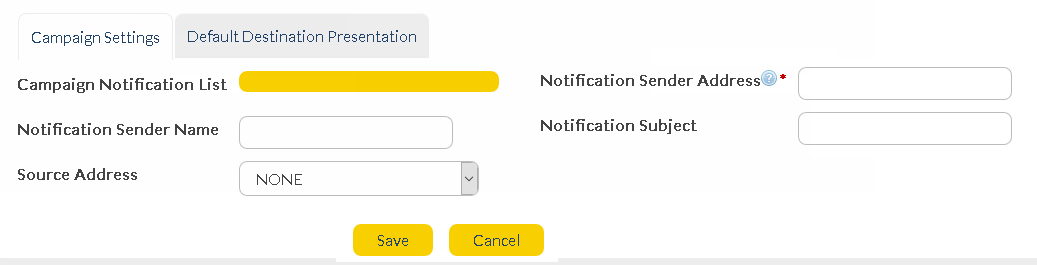
Campaign Notification List
|
Click and type the name of an existing list. When an Email broadcast is launched, all members of this list will be notified by email.
|
Notification Sender Address
|
The email address of the person sending the notification.
|
Notification Sender Name
|
The name of the person sending the notification.
|
Notification Subject
|
The subject of the email notification.
|
Default Destination Presentation
|
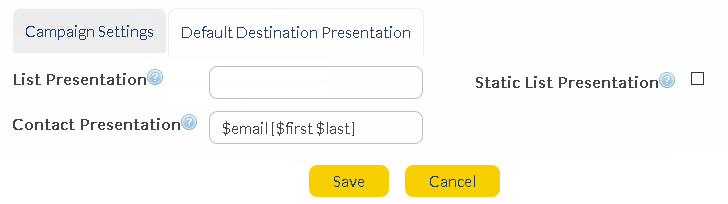
List Presentation |
The values entered in the 'List Presentation' field will replace a contact's email address in any reporting data.
{#} values correspond to list columns
e.g. if {1} {2} values are saved in the 'List Presentation' field, columns 1 and 2 of the receiving list entries will be displayed instead of an email address in any related reports.
|
Static List Presentation
|
The above 'List Presentation' field also appears when you create or edit a list. Ticking this check box ensures that the 'Company Email Preferences' setting will override anything entered in the 'New/Edit List' screen.
|
Contact Presentation
|
The values entered in the 'Contact Presentation' field will replace a contact's email address in any reporting data.
The values correspond to fields set up in the recipient's 'Contact Details'.
e.g. if '$first %last' values are saved in the 'Contact Presentation' field, the receiving contact's first and last names will be displayed instead of an email address in any related reports.
Available values include:
•$first
•$last
•$phone
•$mobile
•$address
•$city
•$country
•$postcode
•$fax
|
|
When a new customer is created, their default 'Contact Presentation' is '$mobile [$first $last]', this means that when you send a message to a contact you will see their details as '12912345678 [First_Name, Last_Name]' In the message reports. |